Points and Lines – User Research Analysis Goodness

One of my favorite sessions at the IA Summit was Laurie Gray’s case study on ethnography of stockbrokers and their trading methods(2 MB PowerPoint. It’s got Laurie’s notes, so you can really follow along).

There’s a lot of good in it, but what most excited me is how Laurie used a simple visualization to better understand what she had observed, and to demonstrate how the current system under consideration satisfied the approach of its users.

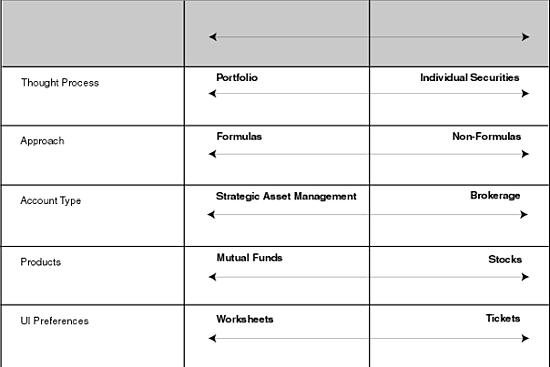
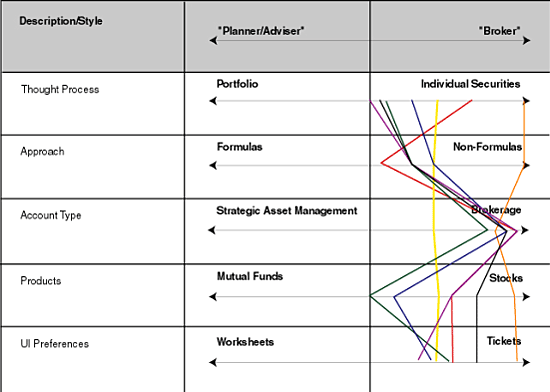
On Slide 10, she introduces the set of simple oppositional continua that emerged from her observations:
laurie_1
In her talk, she mentioned how she didn’t hit upon these herself — she was working closely with a subject matter expert on her client’s side, and the two of them were able to come up with this.

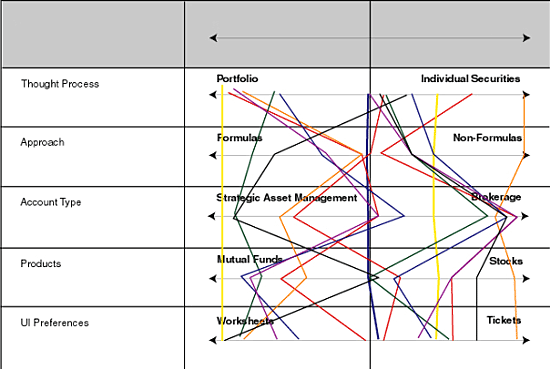
So, then they took each subject, and plotted their approach along these various lines.
laurie_2
Not particularly revealing.

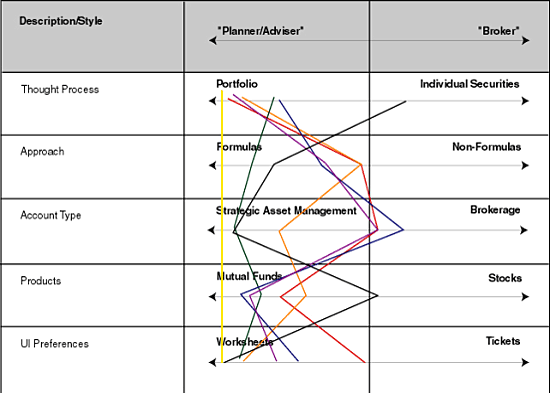
But then they had an insight. If they separated “Brokers” from “Planner/Advisors”, and considered them separately, a trend emerged. First the Brokers:
laurie_3

Then the Advisors:
laurie_4

In her talk, Laurie pointed out that her client hadn’t considered these as two distinct audiences. They’d identified one “user type.” Her research and this analysis made it clear that there were two distinct groups, with significantly different approaches.

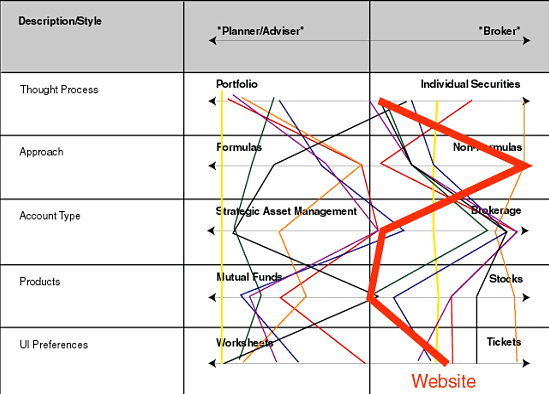
She was able to take this one step further, by plotting how the current web-based system functioned along these various axes.
laurie_5

I love this last graph. It clearly demonstrates that the current system is designed for brokers, and that the planner/advisors are likely having to fight against it. This makes apparent a clear opportunity for the client to pursue.

In general, I just love this set of visualizations. While such attribute-oppositions are common in things like branding and positioning (where you place “your company” along such lines and compare it to other companies), I’d never seen it used as a user research tool. And it proved quite powerful. First in providing the insight around the two distinct user groups. And then in mapping the current system and demonstrating opportunities. Good on Laurie, and something to add to the methodological toolbox.

Brad DeLong Thinks — You Should Listen

From a political point of view, I’m something of an anomaly — a free-trade liberal. (Hell, a free-trade quasi-socialist).

Brad DeLong, economics professor at Cal, and former economics advisor in the Clinton Administration, recently posted to his blog a piece he co-wrote with Stephen Cohen, “Thinking About Outsourcing.”

I continue to find Brad’s thoughts and passion inspiring, perhaps surprising since the subject is, well, the dismal science. He’s able to clearly articulate why free trade, and yes, outsourcing/offshoring are good things, but that it needs to be qualified with a social safety net, which will help mitigate the inevitable shifts within a national economy.

Enterprise Content Management is a Process, Not A Technology

My business partner Jeff just wrote an essay titled, “Why Content Management Fails,” about the pitfalls of standard CMS implementations. CMS vendors have spent years trying to convince customers that content management is a technology, and with the right solution, the problems go away. But in talking to people at organizations big and small, we hear again and again that CMS projects fail. In digging around, we came to the essential realization that “content management” is a process, not a technology.

While we’re far from being the only ones who figured this out, it’s surprising how firmly held the technological orientation is. It’s tempting to blame the vendors (who are in the market to sell Big Applications and all the costly services that go with them), but the bulk of the responsibility goes to the organizations who are not willing to face reality when it comes to the difficulty and complexity of managing content, and thus are easy marks for the supposed magic bullet that solves all their content problems.

At Adaptive Path, In our research and development around content management, what became clear is that the way to address “the content problem” is to separate the “content development” and the “content publishing” aspects of the process. At the outset, focus your content management efforts on the latter — develop strong metadata, develop templates, and treat the CMS simply as a database, a content repository.

Once the people in the organization are comfortable with publishing content in the new system, then they will, on their own, realize that the system can also make the content development processes run smoother. As Jeff points out, if you try to start with the workflow reengineering, you’ll just incur resistance and ire from your staff.

Jeff has developed, with some assistance from me, a really strong one-day workshop on Making Your CMS Work For You, which he’s giving on May 20th in Chicago. (Use the promotion code FOPM for 15% off!)

With our user experience mindset, we ended up developing an approach that is a paradigm shift from “business as usual” with CMS implementations, and should, frankly, help organizations save thousands, if not tens of thousands of dollars, in person-hours and technology costs. One of the workshop’s strongest takeaways is that the vast majority of enterprise websites don’t need fancy CMSes. With a smart approach in place, these website can, in fact, perform *better* with no-to-low-cost tools.

All the pretty colors…

Making the blog rounds is Newsmap, a tool for visualizing what’s getting press around the world.

It’s based on a visualization style known as treemaps. I addressed this topic in an interview I conducted with Marti Hearst, where we called out Smartmoney.com’s “Map of the Market” as an example of a useful, usable, and engaging visualization.

Newsmap is quite keen, though Map of the Market, with it’s green-to-red coding signifying economic trends, packs more of a visceral wallop. Perhaps it would be interesting for Newsmap to not just demonstrate popularity whether a meme is gaining ground or falling. Of course, with news, we’d probably expect most items to lose ground, but it would be keen to see those few things that percolate into the mediasphere.

Things Worth Reading, March 28

“Looking Offshore: Outsourced UCSF notes highlight privacy risk – How one offshore worker sent tremor through medical system”, SF Chronicle.
Investigative reporting showing how the management of sensitive medical information is being outsourced overseas. Bits of it read like a good detective story.

“The staggering price of world’s best research”, SF Chronicle.
All about how journal publishers, namely Elsevier, exploit the free labor of academics for exceeding corporate gain, at the very expense of those same academics. It’s only a matter of time before these scholarly journals move online and become much cheaper (if not free). And good thing, too. The arrogance of these assholes is startling.
[I wrote about this a bit back, “As Goes The Typewriter Repairmen…”]

SET OF MACHINES FOR SAUSAGE MINI-SHOP

“A City is Not a Tree”, by Christopher Alexander. I hadn’t realized this essay was online. It’s one of my favorites from the very hard-to-find ZONE 1/2.

Findory.com
One of my new favorite websites. Similar to Google News, except with an overlaying of personalization that seems to work pretty good. It’s now a regular in my morning reading.

“Caring for Your Introvert”, The Atlantic Online.

The Joy Of Navigation Design

So, I wanted to find out more about designer Ann Willoughby, so I googled her.

sparklines

The top link is to a page on AIGA website.

So, now I know more about Ann Willoughby. But I’m intrigued. She’s listed in a box called “Meet Our Board.”

sparklines

Also in that box I see Nathan Shedroff listed as president. And I did a double take.

I’m on the AIGA site. I see a box labeled “Meet Our Board.” And I see Nathan is listed as President. Is Nathan president of the AIGA? That didn’t *sound* right, I thought somebody else was, but looking at Ann’s page, and clicking to his page on the site, didn’t give me any other clues.

sparklines

So, I desperately searched out navigational cues to figure out what was going on here. The URL: “http://www.aiga.org/Content.cfm?Alias=nathan_shedroff” is useless — there’s no suggestion of hierarchy or place there.

The word “Members” in the navigation bar seems to be highlighted (it’s black, the others are gray), but clicking it takes me to a page about member benefits and I don’t see anything about any boards.

Huh. So now what? Nathan is the president of what board? Clicking around the other global navigation elements (Forum, Publications, Initiatives) turned up nothing.

So I do a search on “Nathan Shedroff”, and here are the results (I can’t link to the results, because the results page does not provide a unique URL):

sparklines

Ahh! That looks like a breadcrumb. And it shows a thing called “about our board” in something called “communities of interest”.

Clicking “about our board” reveals this page. If you read closely, you might see something about the AIGA Center for Brand Experience. Well. What’s that? There’s little clue on this page.

sparklines

Going back to that search result, the link above “about our board” is “communities of interest.”

sparklines

Oh! Look at those things over on the right side. “Brand Experience”!

sparklines

And on that page, a link to “Meet Our Board”, featuring Ann Willoughby, who got me started on this wild goose chase.

All of this could have been mitigated with a few simple conventions/best practices in navigation design. All I needed were breadcrumbs on that original Ann Willoughby page to tell me where I was on the site, and how to click “up” a level. Barring that, the global navigation could have been better tied to the second-level navigation. If you look at the “Communities of Interest” page above, what you probably didn’t see was that there’s an item in the left-hand navigation that is now ‘selected.’ But because the left-hand navigation is so far removed from the global navigation, it never occurred to me that the two were related.

Had I clicked down through the site, this all might not have been as much of an issue, but when I found myself on a page deep within the AIGA’s labyrinth, care of Google, I was totally disoriented.

Now, ask yourself, how does the “Page Paradigm” help you here? The page paradigm totally ignored what became the *key* element of my research. My original “goal” was to learn about Ann Willoughby. On reading that page about Ann, my goal shifted, to learn more about this “board”. Shifting and evolving goals are not only common — they are the norm.

The page paradigm totally broke down, because I couldn’t click something to take me to my new, evolving goal, nor could I click the back button on my browser, as that would just bring me back to Google. Strong navigation design would have oriented me in this information space (AIGA.org), serving as a scaffold for attempting to deeply understand a topic and its relationships.

In thinking about it a little further, imagine someone coming to the site who isn’t as personally invested as I was in tracking this down (I’m friends with Nathan, and have met Ann, so I’m perhaps not typical). Upon clicking to Ann’s original page, and then to Nathan’s, that person might have simply assumed that Nathan is the President of the AIGA, and left the site, not realizing this was incorrect. And then this person could have acted on this incorrect information in some way. Navigation design isn’t just about finding things — it imbues meaning based on the contexts it provides.